Dext Alternatives 2026 for Accounting Firms: VoiceAccountant vs Dext, Hubdoc & QuickBooks receipt capture
Last updated: October 2026 · Written for accounting firms and bookkeepers
If you run a practice on Dext, you already know what it does well: it reads receipts and bills, extracts the data, and publishes to your ledger. The reasons firms start comparing alternatives are about everything around that step: per-client pricing with a 10-client minimum, receipts that still have to be chased, a reconciliation that happens in a different tool, and auto-publish rules that put a mis-read receipt in the books before anyone looked at it.
There is also a 2026 reason to shop around. Xero retired Hubdoc on May 8, 2026 and replaced it with Xero Files, which stores documents but does not extract data from them. Firms that had split clients between Dext and Hubdoc are now choosing one capture tool for everyone.
This comparison is written for that decision. It looks at four options from a firm's point of view: how receipts get to you, who signs off before anything is posted, whether the receipt travels with the entry into QuickBooks, and where the bank statement gets matched. It is also honest about what VoiceAccountant does not do yet.
Short on time? VoiceAccountant does what Dext does for receipt capture, then adds voice capture, an approval gate for the accountant, and bank statement matching in the same workspace. Approved entries post to QuickBooks Online with the receipt attached. It does not sync to Xero or Sage yet, has no live bank feeds, and does not run payroll. Every firm starts with a 14-day free trial, no credit card, no client minimum.
VoiceAccountant vs Dext vs Hubdoc vs QuickBooks receipt capture
All four capture receipts. The differences are in how the receipt gets to you, who signs off before it is posted, and where the bank statement gets matched. A key difference with VoiceAccountant is that its AI reasons about the transaction, not just extracts data: it identifies the correct vendor, category, and tax treatment. Entries are confidence-scored so you approve high-confidence drafts and flag uncertain ones for review, which means fewer errors reach your books. "Was" marks a Hubdoc feature that ended with its retirement.
| Feature | Dext | VoiceAccountant | Hubdoc (retired May 2026) | QuickBooks receipt capture |
|---|---|---|---|---|
| Photo and document capture | Yes | Yes. Photos, scans, PDFs, Word files, text. Bulk upload of many files or scans at once, plus Google Drive import | Was. Xero Files stores only, no extraction | Yes |
| Voice capture | Not offered | Yes. "Forty dollars, fuel, Shell" | Not offered | Not offered |
| Email intake | Yes | Yes. A forwarding address per client | Was | Yes |
| AI draft with a confidence score | Extraction | Yes. A score on every draft, low ones flagged | Was extraction | Extraction |
| Accountant approval before posting | Optional; auto-publish rules available | Required. Auto-approve is opt-in per client | Was optional | A review tab inside QuickBooks |
| Posts to QuickBooks Online with the receipt attached | Yes | Yes. Correct vendor, category, tax, and document. Confidence scoring means fewer review errors | Was | Native. No reasoning, just pattern recognition |
| Bank statement matching in the same workspace | Statement extraction; matching happens in your ledger | Yes. Upload the PDF, each line is matched to an entry | Not offered | In QuickBooks, from its own feeds |
| Live bank feeds | Through your ledger | Not yet | Retired in 2022 | Yes |
| Client app with your firm's name on it | Dext-branded app | Yes. Your name and logo, iOS and Android | Was Hubdoc-branded | QuickBooks app |
| Web app and mobile app | Yes. Web app and a Dext-branded mobile app | Yes. Web dashboard for you, iOS and Android app for clients, in your firm's name | Was | Yes. Web app and the QuickBooks app |
| Client messaging inside the tool | Not offered | Yes. Text, photos, files and voice notes | Not offered | Not offered |
| Xero or Sage sync | Yes | Not yet | Xero only | Not applicable |
| Payroll | Not offered | Not yet | Not offered | Paid add-on |
| Published pricing (October 2026) | About $25/month (Business). Practice plans about $18 to $19 per client per month, annual term, 10-client minimum | 14-day free trial, no card. Firm plans being finalized. No client minimum | Retired. Xero Files comes with Xero plans | Included in a QuickBooks Online subscription |
Competitor details are taken from each vendor's public pages as of October 2026 and can change. Check the vendor for current terms.
Where Dext falls short
- It is expensive as you add small clients. Published practice pricing is about $18 to $19 per client per month with a 10-client minimum, and reviewers also cite USD pricing for Canadian users.
- Auto-publish can put a mis-read receipt in the books before anyone reviews it, and it needs supplier rules and tax defaults set up first.
- It reads documents. It does not hear your clients. We found no voice capture and no client messaging in its published features.
- Your clients get a Dext-branded app, not one with your firm's name and logo.
- Support and billing draw complaints. Some reviewers report slow support responses and billing or cancellation problems. Individual experiences vary.
Why firms look past Dext
Dext is a capable capture tool. In the conversations we have with firms, the reasons they start comparing are about what happens before and after the capture.
1. Cost that scales by the client
Per-client practice pricing with a 10-client minimum adds up for a firm with a long tail of small clients who send twelve receipts a month. VoiceAccountant starts free, with no minimum, and the client app is free for them to install.
2. Support you can reach
When a client's receipts stop arriving on the 28th, you need an answer that day. Email us and a person replies. There is no tier where support becomes a paid add-on.
3. Reconciliation lives somewhere else
Capture in one tool, match the statement in another, and explain the gap in a third. In VoiceAccountant the statement is uploaded next to the receipts, and each line is matched to its entry before you push anything to QuickBooks.
4. Publishing without a sign-off
Auto-publish rules are fast until a mis-read receipt lands in the ledger and you find it at year end. In VoiceAccountant the accountant approves before anything posts, and the AI tells you which entries it is unsure about so you can clear those first.
5. Chasing documents
Clients ignore a scanning app they did not choose. They do talk to their phone. Each client gets an app with your name on it, a forwarding address, and a short code to join, so receipts arrive the day they happen instead of in a shoebox in March.
What stays the same: you keep QuickBooks Online, your chart of accounts, your GIFI codes and your tax setup. The only thing that changes is how the receipts get to you and who signs off before they post.
The workflow, A to Z
One tool covers the whole chain. Here is what a single receipt goes through.
- Capture. The client says the expense, snaps the receipt, forwards the email or uploads the PDF. Whether they are a freelancer, a contractor, a store owner, a retailer, a corporation or any other business type, it is the same app with your firm's name on it.
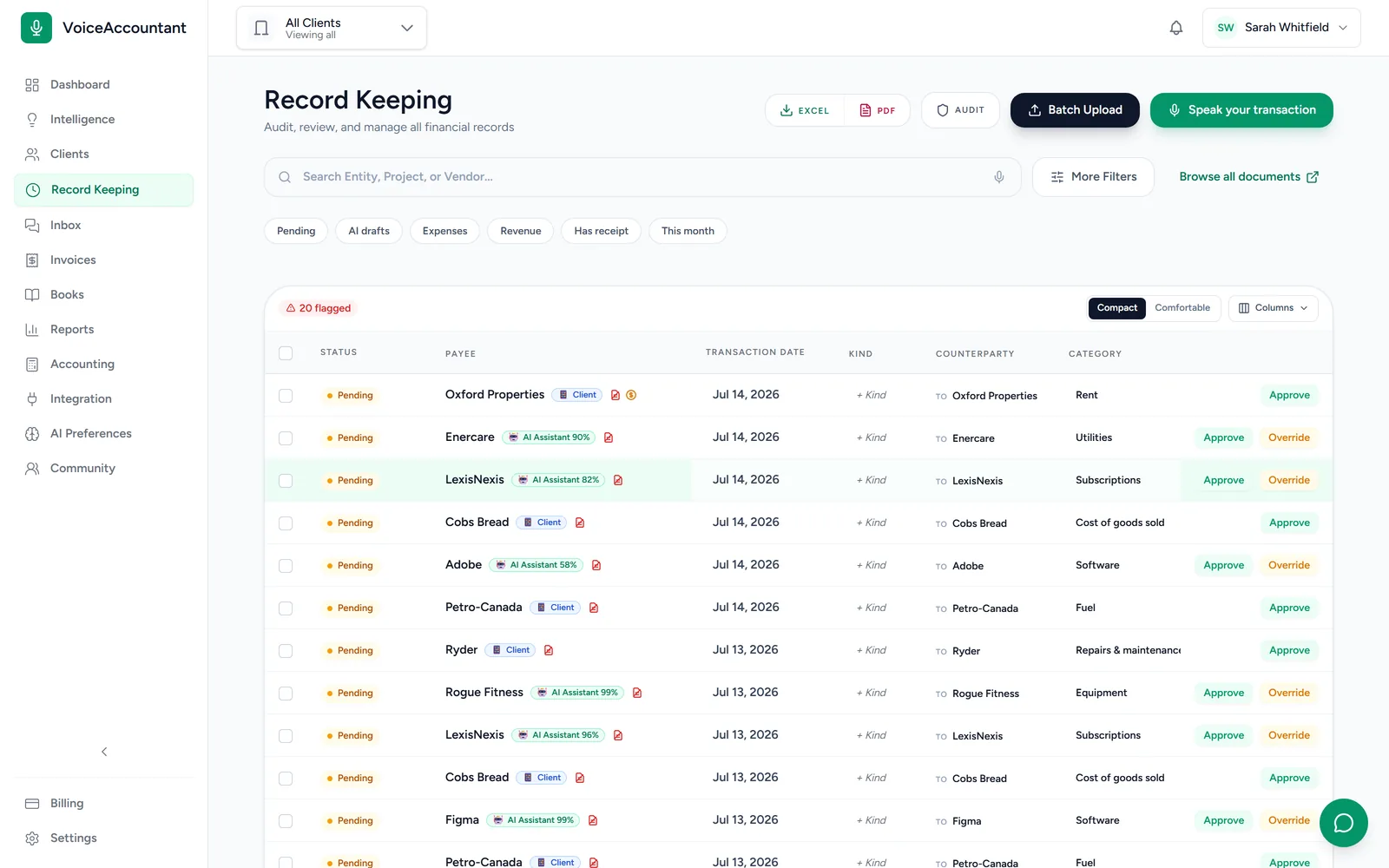
- Draft, with a confidence score. The AI fills in vendor, amount, tax, category and GIFI code, attaches the document, and scores its own confidence. Low scores are flagged. Your corrections become vendor rules for next time.
- Approve. You work the review queue, clearing the doubtful ones first. Nothing is filed or pushed until someone on your team approves it. Trusted clients can be set to auto-approve above a score you choose.
- Post to QuickBooks with the receipt. Each approved entry is pushed to the client's QuickBooks Online company with vendor, category, tax and the source document attached. Open it in QuickBooks and the receipt is already there.
- Match the statement. Upload the bank or card statement. Every line is read and matched against the entries already in the books. Unmatched lines wait for you to confirm, create an entry, or exclude. The statement is also checked so that opening balance plus movements equals the closing balance.
- Report and reply. Run the client's reports, export CSV or PDF, and message them from the same screen when something is missing. Every step is written to a permanent audit trail.
What it is worth to a firm
We do not publish a "firms save X hours a month" figure, because we have not measured your firm. What we can give you is the arithmetic, so you can run it on your own numbers.
Take a firm with 25 clients sending 40 documents each per month, which is 1,000 documents. If typing an entry from a receipt takes about three minutes and reviewing a draft that already has the vendor, tax and code filled in takes about one, the difference is two minutes per document, or roughly 33 hours a month. Change any of those numbers and the result moves with them. The three places the time comes from:
- Fewer receipts to chase. Clients capture at the moment of spending, so the month-end shoebox gets smaller.
- Fewer keystrokes. You review a draft instead of typing an entry.
- Fewer tools. Capture, approval, QuickBooks posting and statement matching happen in one place.
What VoiceAccountant does not have yet
Before you switch, three things firms ask about, answered plainly:
- Xero and Sage sync. Not yet. QuickBooks Online is the only filing target. Everything else leaves as CSV or PDF.
- Live bank feeds. Not yet. Statements are uploaded as PDFs and read line by line. A feed is on the list, not in the product.
- Payroll. Not yet. Pay stubs are kept out of the ledger on purpose, so they never post as expenses by mistake. Payroll stays in your payroll tool.
If your practice needs Xero or Sage publishing, live bank feeds or payroll inside the capture tool, Dext may still fit you better today.
Frequently asked questions
Does VoiceAccountant replace Dext? For receipt and document capture feeding QuickBooks Online, yes. Clients send receipts by voice, photo, email or upload, the AI drafts each entry with a confidence score, you approve it, and it posts to QuickBooks with the document attached. If you rely on Dext for Xero or Sage publishing, VoiceAccountant does not cover that yet.
Does Dext do the same job as VoiceAccountant? Partly. Both extract data from receipts and invoices and publish to QuickBooks Online, and both take photos, email and PDFs. VoiceAccountant adds voice capture, drafts income, transfers, loans and bills as well as expenses, requires accountant approval before anything posts (auto-approve is opt-in per client), shows a confidence score on every draft, and includes bank statement matching, a firm-branded client app and client messaging. Dext is ahead on Xero and Sage publishing and has been on the market longer. If your firm uses QuickBooks Online, VoiceAccountant can replace it. If you publish to Xero or Sage, it cannot yet.
Is VoiceAccountant cheaper than Dext? Every firm starts with a 14-day free trial, no credit card and no minimum number of clients. Dext's published practice plans run about 18 to 19 dollars per client per month on an annual term with a 10-client minimum. Our paid firm plans are being finalized, so compare against the price we publish, not a promise.
Can I import my Dext data? There is no one-click Dext importer. Your posted history already lives in QuickBooks Online, and that stays. For the documents themselves, export them from Dext and drop them into the Document Hub with batch upload. The AI files them into folders and drafts an entry for each one you still need.
Does VoiceAccountant post to QuickBooks like Dext does? Yes, and the receipt goes with it. Connect each client to their QuickBooks Online company. Every entry you approve is pushed with the vendor, category, tax and the source document attached, so the receipt is on the transaction when you open it in QuickBooks. Nothing is pushed before you approve it.
What does VoiceAccountant not have yet? Three things firms ask about: Xero and Sage sync, payroll, and live bank feeds. Today the only filing target is QuickBooks Online, statements are matched from an uploaded PDF rather than a feed, and payroll stays in your payroll tool. We would rather you know that now than find out in week two.
Which kinds of clients can use it? Any business that spends money and keeps receipts: freelancers, contractors, store owners, retailers, corporations, and anything in between. Each client gets the same app with your firm's name on it. Their books stay separate in your dashboard, and you switch between them in a click.
Try it with one client
Set up your firm, invite one client with a short code, and watch their first receipt land in your review queue. You keep QuickBooks Online, and you approve everything before it posts. Try VoiceAccountant free for 14 days → No credit card.
Related reading: 7 best Dext alternatives in 2026 (for freelancers and solo owners) and Voice Accountant vs Dext, Xero & WellyBox.
Sources: Dext help: QuickBooks Online integration, Dext pricing, Hubdoc retirement, May 2026. Dext, Hubdoc, Xero and QuickBooks are trademarks of their respective owners; VoiceAccountant is not affiliated with them. Pricing and product availability accurate as of October 2026; verify current details with each provider.